Smurfstudio Onboarding
3DGS Quizlet Set Link: https://quizlet.com/1199040848/smurfs-ii-3dgs-onboarding-flash-cards/?i=78ntgh&x=1jqt
3DGS Quizlet Set Password: splatastic
Introduction to Smurfstudio
Smurfstudio
Smurfstudio is a research fork of Nerfstudio, a modular radiance field training and evaluation framework, designed for developing new methods for spacecraft reconstruction. As a result of its being a fork, most Smurfstudio-specific functionality is implemented by modifying or extending existing Nerfstudio components. The repository therefore retains much of Nerfstudio’s original directory structure, command-line tools, configuration system, and naming conventions.
Nerfstudio
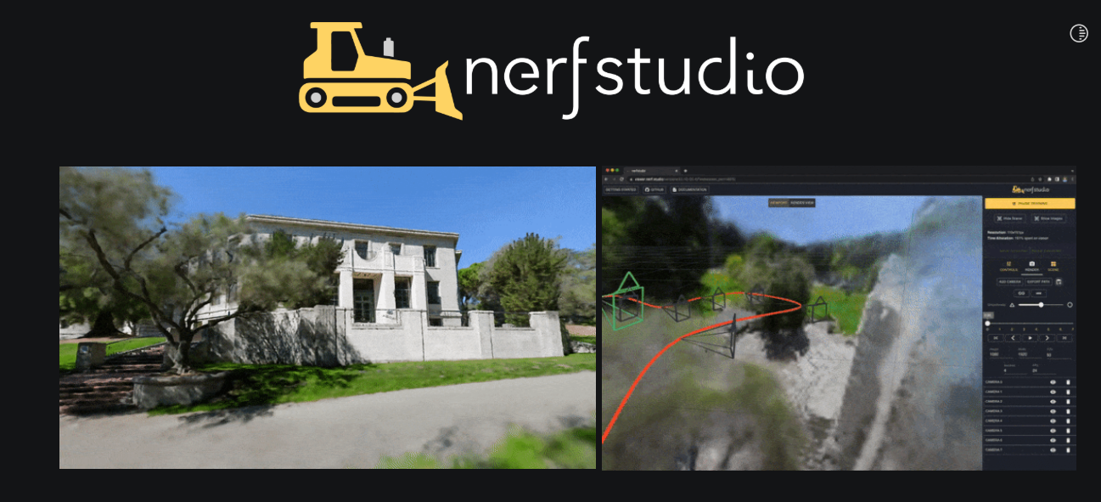
Nerfstudio is the primary framework on which Smurfstudio is built. It provides the high-level infrastructure for loading datasets, managing cameras, configuring models, running training and evaluation, saving checkpoints, rendering outputs, and interacting with trained models through Viser.
Important Nerfstudio components include:
- Data parsers and data managers, which load images, camera intrinsics, camera poses, masks, illumination information, and other dataset metadata.
- Models, which define the trainable scene representation, rendering process, losses, metrics, and Gaussian refinement behavior.
- Fields, which contain neural networks or parameterized functions used to predict appearance, shadow corrections, or other per-Gaussian properties.
- Pipelines, which connect the data manager and model and coordinate training, evaluation, and rendering.
- Trainer and configuration classes, which define optimization settings, training schedules, checkpoint behavior, viewer options, and experiment-specific parameters.
- Viewer and rendering utilities, which expose model outputs through Viser and support offline rendering and evaluation.
Training is generally performed through Nerfstudio’s ns-train command. A method configuration selects the model, pipeline, data manager, optimizers, and default parameters. Individual settings can then be overridden through command-line arguments or project-specific configuration files. Each training run saves a configuration file alongside its checkpoints. This configuration should be treated as part of the trained model because it records the classes and settings needed to reconstruct the pipeline when the model is loaded later.
gsplat
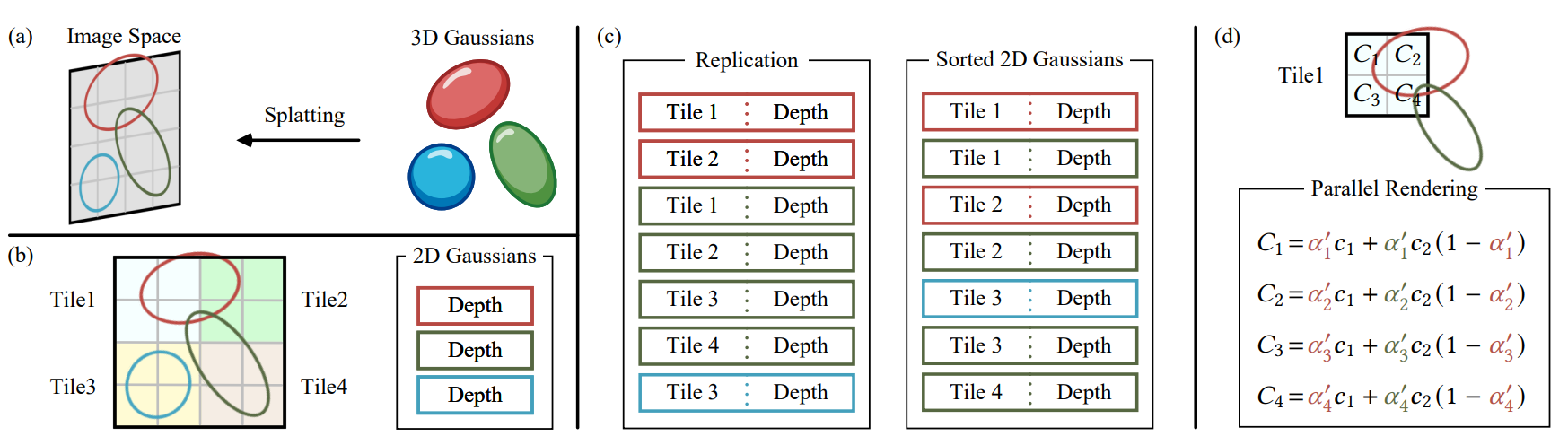
The Gaussian rasterization library used to render 3D Gaussian Splatting models. It performs the low-level projection, sorting, compositing, and gradient calculations required during training and rendering. gsplat is included in Smurfstudio as a Git submodule. It exists as a separate repository that can be accessed from within the Smurfstudio directory, while retaining its own branches, commits, and remote repository. The version used by SmurfStudio is a fork owned by the MLDS-Laboratory GitHub organization. Smurfstudio tracks a specific gsplat commit rather than automatically following the latest version of a branch. After cloning or pulling Smurfstudio, the submodule may therefore need to be initialized or updated using git submodule update --init --recursive. Changes to gsplat should be committed and pushed within the gsplat repository first, after which the updated submodule commit reference must also be committed in Smurfstudio.
Data and Model Outputs
When training and inspecting trained models, you will need locations to store both training data and models. While there are /data/ and /outputs/ directories under the Smurfstudio repository, it is highly recommended that researchers (when working on Curiosity, the lab’s shared computer) store both training datasets and trained models on the large 3.5T /data/ drive, which is separate from the /home/ directory that most of the working repositories are on. This is to ensure that the /home/ directory does not become too full.
Training a 3D Gaussian Splatting Model
Training Data
A training dataset typically includes:
- Images used as the reconstruction targets.
transforms.json, which stores the camera intrinsics and per-frame metadata. Each frame generally includes the image path and a camera-to-world transformation matrix (Check out this page Logan made on NeRFs that talks more about intrinsic and extrinsic matrices: https://logggy.github.io/Loggy-NeRFs/nerfs/). Some datasets also include a sun direction or illumination angle for each frame.- Point-cloud files, which may be used to initialize the Gaussian positions instead of relying on random initialization.
- Mesh files, when using the Mesh-Aware training strategy. The mesh provides approximate surface information used to guide Gaussian initialization, refinement, or pruning.
Before training, verify that the image paths, coordinate conventions, camera poses, and optional illumination metadata are consistent with the corresponding data parser.
Training Config File
Splatfacto_train_example.py is the primary configuration file used to kick off 3DGS training. It defines the model, dataset parser, training pipeline, optimizers, viewer settings, and experiment-specific options. The file can be copied or modified to create configurations for new datasets and experiments.
During Training
The terminal displays the current training step, iteration speed, and estimating training time remaining. Additional messages may appear when adaptive density control operations are performed, including:
- Gaussian duplication or splitting
- Gaussian pruning
- Refinement pauses or schedule changes
- Updates from Mesh-Aware or Support-Aware strategies
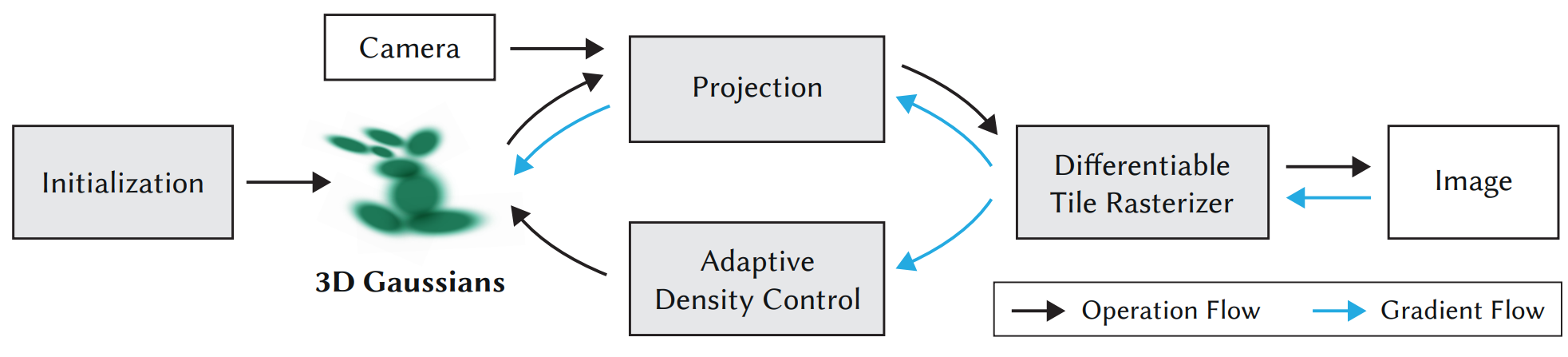
These messages are useful for identifying unexpected behavior, such as excessive pruning, uncontrolled Gaussian growth, stalled optimization, or a model collapsing early in training.
The Viser viewer can also be used to inspect the reconstruction while training. Viewer setup and usage are described below. When Weights & Biases is enabled, losses, metrics, Gaussian counts, images, and other tracked values may also be logged to the associated online run.
After Training
Training outputs are stored in the configured output directory, typically inside a folder organized by method, experiment name, and run timestamp.
Important files include:
config.yml, which records the training configuration and is used to reload the model.- Checkpoint files (
.ckpt), commonly stored in anerfstudio_modelsdirectory. These contain the learned model parameters and training state. - Training logs and rendered outputs, when enabled by the configuration or generated by later evaluation scripts.
- Weights & Biases files, when local W&B logging data is retained.
The config.yml and its associated checkpoint files should be kept together. The configuration identifies the model classes and settings required to correctly reconstruct the training pipeline when viewing, evaluating, or continuing training from a saved model.
The multiple_model_view_example.py script can be used to load one or more trained models into the Viser web viewer by specifying the path to each model’s config.yml. This allows models to be inspected individually or transformed and composed into a shared scene after training. Note: older models, as well as models that use different shadowing methods may be incompatible with one another unless config/shadowing modes are overridden manually.
Viser Web Viewer
Viser is the browser-based visualization interface used by Smurfstudio and Nerfstudio to inspect radiance-field models during and after training. It can display rendered RGB images, depth and accumulation outputs, training cameras, point clouds, Gaussian geometry, and other model-specific debug visualizations. When a training or viewing script starts, the terminal prints a local Viser URL and port. For models running on a remote machine, this port must be forwarded through Visual Studio Code or SSH before the viewer can be opened in a local browser.
The viewer can be used to:
- Move the virtual camera around the reconstructed scene
- Inspect the model from arbitrary viewpoints
- Compare rendered outputs such as RGB, depth, and shadow maps
- Display or hide training cameras and scene geometry
- Adjust viewer controls exposed by the active model or script
- Inspect multiple transformed models in a composed scene
The Viser viewer is primarily intended for interactive inspection and debugging. Final evaluation images and metrics should be generated using the appropriate rendering or evaluation scripts rather than manually captured from the viewer. For the most accurate visual inspection, I recommend setting max_res to the highest possible value and using the sliders/boxed value to input the sun angle(s) seen in training to best represent what the model sees during training.